INV-12 Inventory Adjustment Report
Inventory ledger entries with transaction type and reason code for audit.
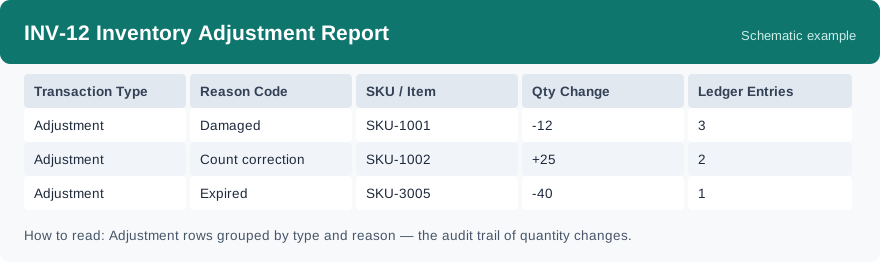
This report shows the inventory ledger entries — the written record of every change to stock quantity — grouped by transaction type, reason code and SKU, with the total quantity change and how many entries sit behind it. It reads live data, so entries show up as movements happen. It is the report to open when a quantity needs explaining.
What this report is for#
Use it to audit and to trace: when a quantity on hand does not match what someone expects, this report is where you find what changed, by how much, and under which reason. It is also the supporting list behind month-end checks and client questions about stock movements.
How the numbers are counted#
Every inventory movement writes a ledger entry. Within this report, the adjustments are the entries whose transaction type is an adjustment; the other transaction types are the ordinary movements. The reason code on an entry explains why the quantity changed, and each row adds up the quantity change and counts the entries for its transaction type, reason code and SKU.
Dimensions and filters#
- Transaction Type — the kind of movement the entry records
- Reason Code — why the quantity changed
- SKU / Item — the product
- Qty Change — the total quantity change for the row
- Ledger Entries — how many ledger entries sit behind the row
- Filters you can set: date range, warehouse and client.
How to read it#
Set the date range to the stretch you are investigating, then find the SKU. Read the quantity change next to the entry count and the reason code: a big quantity change with few entries is one large change, while the same change spread over many entries built up in small steps. For a question about one specific change, the reason code on its row is the first place to look.
Typical uses#
- Investigating a quantity difference: set the period, find the SKU, and walk its rows until the change that explains the difference shows up.
- Month-end audit support: export the month as a CSV and keep it with the audit papers, with reason codes explaining the adjustments.
- Reviewing adjustment habits: if the same reason code keeps appearing for the same SKU, that pattern is worth a conversation with the floor team.
Report features used in this article: open INV-12 in Reports, set the date range, warehouse and client, and click Run; download the result as a CSV when you need it as an audit record, or set up a subscription so the same view arrives by email on a schedule.
Note on subscriptions: your subscription and its filters are saved right away. Scheduled email delivery is being switched on in stages — sending starts as soon as delivery opens for your organization.