OUT-06 Outbound Transaction Detail
Line-level outbound quantities by shipment, SKU and lot.
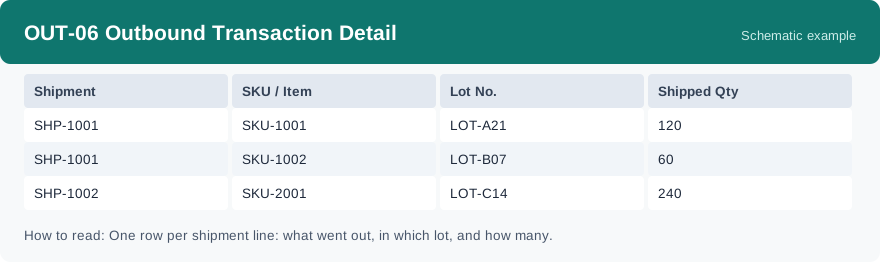
This report is the line-level detail of outbound shipments: each row is one shipment line, showing which shipment it belongs to, which SKU and lot went out, and how many were shipped. It uses real-time data, so it reflects shipment lines as they stand when you run it.
What this report is for#
Use it when you need the exact lines behind a shipment: what went out, in which lot, and how much. It supports shipment checks, quantity reconciliation and lot tracing — whenever a summary number is not enough and you need to see the lines themselves.
How the numbers are counted#
This report lists the detail lines of outbound shipments created in the period you select: if a shipment was created in that period, its lines are counted here. The quantity on each row is the shipped quantity recorded on that line. You only see lines from your own organization — the scope of this line-level report is kept at organization level.
Dimensions and filters#
- Shipment — which outbound shipment the line belongs to
- SKU / Item — the product on the line
- Lot No. — the lot the quantity came from
- Shipped Qty — how many went out on that line
- Filters you can set: Date range
How to read it#
Each row is one line, not one shipment: the same shipment appears on several rows when it carries several SKUs or lots. To get the total for one shipment, add up its rows. Set the date range to the period you want to check — remember the period follows when the shipment was created — then read the SKU, lot and quantity on each row.
Typical uses#
- Verify exactly what went out on one shipment
- Trace which lots were shipped in a period
- Reconcile shipped quantities by SKU
Reports features used in this article: pick this report in Reports, set the Date range and click Run to see the result; use Export to download the result as a CSV file; or use Subscribe to have the same view sent to your inbox on a schedule. Your subscription and its filters are saved right away, and scheduled email delivery is being switched on in stages — sending starts as soon as delivery opens for your organization.
How this differs from its neighbours: OUT-02 Fulfillment Progress Report and OUT-07 Open Orders Report count whole outbound orders by stage and status; this report goes one level deeper and shows the lines inside each shipment. To see how much of a lot is still on hand after shipping, use INV-03 Inventory by Lot.