OPS-03 Wave Performance Report
Wave counts and order volumes by wave status and pick method.
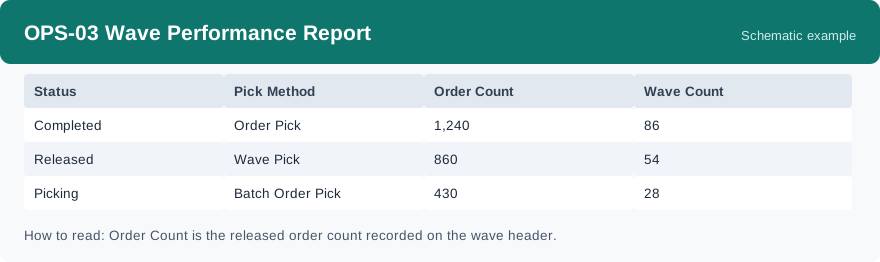
This report shows how many waves ran and how many orders they carried, grouped by wave status and pick method. It uses real-time data, so it reflects the waves as they stand when you run it.
What this report is for#
Use it to see the shape of wave work: how much volume goes through waves, which pick methods carry it, and how many waves are still open in each status. It is the volume view of waves, not the place for per-wave timing.
How the numbers are counted#
Order Count is the released order count recorded on the wave header, and Wave Count is how many waves fall in the group. How long one wave took (dispatched to completed) is read in the wave detail; this report is the volume view and does not show cycle time.
Dimensions and filters#
- Status — the wave status
- Pick Method — how the wave is picked
- Order Count — released orders carried by the waves in the group
- Wave Count — how many waves in the group
- Filters you can set: Date Range, Warehouse
How to read it#
Each row is one wave status with one pick method. Read Order Count against Wave Count on the same row: together they tell you the average size of those waves. Rows in an open status are work still moving; rows in a completed status are volume already through.
Typical uses#
- Check how many waves and orders each pick method carried today
- Spot waves piling up in an open status
- Compare wave volume between warehouses
Reports features used in this article: pick this report in Reports, set the date range or warehouse filter and click Run to see the result; use Export to download the result as a CSV file; or use Subscribe to have the same view sent to your inbox on a schedule. Your subscription and its filters are saved right away, and scheduled email delivery is being switched on in stages — sending starts as soon as delivery opens for your organization.
How this differs from OPS-02 Task Completion Report: OPS-03 groups the work by wave — status and pick method, with order volumes from the wave header — while OPS-02 groups the underlying tasks by type and status per day. Use OPS-03 for the wave picture, and OPS-02 for the task picture.