OPS-06 Operations Exception Report
Operation issue and exception-related audit actions by action and target type.
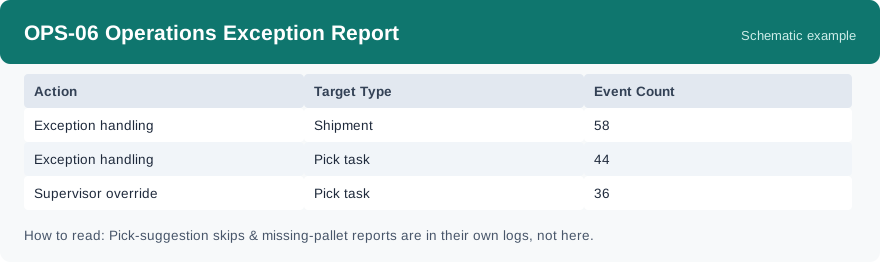
This report counts exception-related and other key operation actions, grouped by action and target type: how many times each kind of action was recorded, and on what kind of object. It uses real-time data, so actions appear as soon as they are recorded.
What this report is for#
Use it to keep an eye on the exceptional side of operations: how much exception handling is happening, how often supervisors step in with an override, and which kinds of objects attract the exceptions. It is the main exception view for day-to-day review.
How the numbers are counted#
This report counts recorded audit actions, including exception handling and supervisor overrides. For now, two kinds of events are not in this report: skipping a suggested location and reporting a missing pallet are kept in their own logs and are reviewed there — so a low count here does not mean those events did not happen.
Dimensions and filters#
- Action — what action was recorded
- Target Type — what kind of object the action was on
- Event Count — how many events in the group
- Filters you can set: Date Range
How to read it#
Each row is one action on one kind of target. Read the biggest rows first: they show where exceptional handling concentrates. A rise in supervisor overrides on one target type is worth a closer look — it can mean the normal path is blocked there. Remember the scope: skipped suggestions and missing pallets are counted in their own logs, not here.
Typical uses#
- Review how much exception handling happened this week
- Watch supervisor overrides for one target type that keeps rising
- Check which target types attract the most exceptions
Reports features used in this article: pick this report in Reports, set the date range filter and click Run to see the result; use Export to download the result as a CSV file; or use Subscribe to have the same view sent to your inbox on a schedule. Your subscription and its filters are saved right away, and scheduled email delivery is being switched on in stages — sending starts as soon as delivery opens for your organization.
How this differs from OPS-01 Picking Accuracy Report: OPS-01 uses exception reports as the numerator of a monthly accuracy rate per warehouse. OPS-06 does not compute a rate — it counts the recorded actions themselves, including exception handling and supervisor overrides, by action and target type. And the error rows in OPS-04 Packing Productivity Report stay at the packing station, while OPS-06 spans operations.