INV-08 Dead Stock Report
Stock whose last ledger movement falls inside the selected window, with on-hand quantity.
This report lists the stock whose last movement falls inside the window you select, together with how much of it is still on hand — the list you work through when you want to push stock that has stopped moving towards a decision. The figures are updated daily rather than live, and the results carry a small “data as of” note.
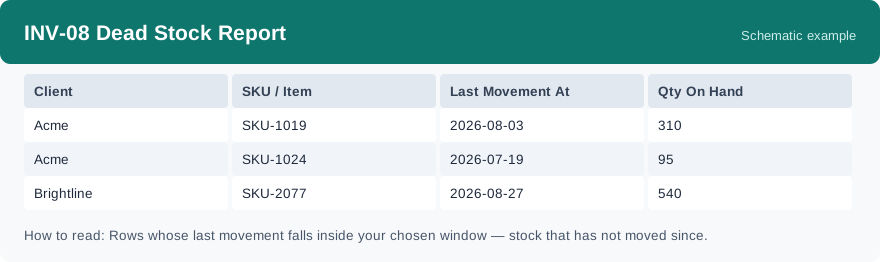
What this report is for#
Use it to find stock that has stopped moving and push it towards a decision — clearance, return to the client, or another agreed handling — instead of letting it sit in the warehouse month after month. Each row tells you both how long it has been since the SKU last moved and how much of it is still there.
How the numbers are counted#
Last movement means the time of the most recent inventory ledger entry for that SKU. To list stock that has not moved since a cutoff, set the window to a stretch that ends at that cutoff — for example the 30 days before the cutoff — and the report returns the stock whose last movement falls inside that window. The quantity shown is the current on-hand quantity from inventory detail, as of the “data as of” time shown with the result.
Dimensions and filters#
- Client — the client the row belongs to
- SKU / Item — the product
- Last Movement At — the time of the most recent ledger entry for the SKU
- Qty On Hand — how much of it is currently on hand
- Filters you can set: date range, warehouse and client.
How to read it#
Start from the earliest last-movement times: those rows have been sitting the longest. Read the on-hand quantity next to the date — a large quantity with an old last-movement date is the most urgent row, because the most stock is tied up for the longest time. Rows are per client and per SKU, so the same product can appear once for each client who owns it.
Typical uses#
- A regular cleanup round: export the list, work through it row by row, and agree a handling for each SKU.
- Talking to a client about their slow stock: the last-movement date and the on-hand quantity are the two facts the conversation needs.
- Checking a cleanup worked: run the same window again later and see whether the list got shorter.
Report features used in this article: open INV-08 in Reports, set the date window, warehouse and client, and click Run; download the result as a CSV to work through it as a cleanup list, or set up a subscription so the list arrives by email on a schedule.
Note on subscriptions: your subscription and its filters are saved right away. Scheduled email delivery is being switched on in stages — sending starts as soon as delivery opens for your organization.