INV-02 Inventory by Location
Stock detail per location for finding goods and location governance.
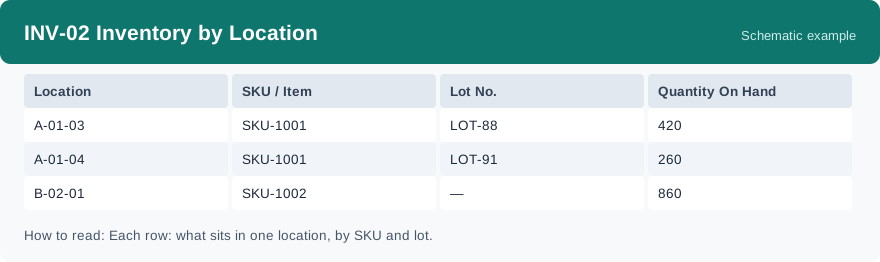
This report breaks stock down to the location level: which SKU, in which lot, sits in which location, and how much is there. It uses real-time data, so it reflects where goods are when you run it.
What this report is for#
Use it when you need to find goods on the floor, or to tidy up locations: for example, to see which locations hold a given SKU, or which locations hold only a small remainder.
How the numbers are counted#
Each row is one location, one SKU and one lot, with the on-hand quantity from the inventory detail added up for that combination. If the same SKU in the same lot sits in two locations, you will see two rows — one per location.
Dimensions and filters#
- Location — the storage location
- SKU / Item — the product
- Lot No. — the lot the stock belongs to
- Quantity On Hand — on-hand quantity in that location for that SKU and lot
- Filters you can set: Warehouse, Client
How to read it#
Start from the location: one row tells you exactly what is in that location for that lot. To find all the places a SKU is stored, look for every row with that SKU. To check one location, look at all rows with that location — different SKUs and lots in the same location appear as separate rows.
Typical uses#
- Find where a SKU is stored before picking or checking
- Spot locations holding only a small remainder and tidy them up
- Check what is actually in a location during a count
Reports features used in this article: pick this report in Reports, set the warehouse or client filter and click Run to see the result; use Export to download the result as a CSV file; or use Subscribe to have the same view sent to your inbox on a schedule.
Note on subscriptions: your subscription and its filters are saved right away. Scheduled email delivery is being switched on in stages — sending starts as soon as delivery opens for your organization.