INV-10 Safety Stock & Replenishment Report
Pick-face minimums vs current quantity with the suggested replenishment quantity.
This report compares, for each SKU at each pick location, the minimum quantity you set against the quantity currently there, and works out how much to top up. It reads live data, so the current quantity is the picture right now.
What this report is for#
Use it to keep pick locations from running empty. When the quantity at a pick location falls towards the minimum you set, this report says so in one list — with the amount to bring over already worked out — so the floor team can top up before picking stalls for lack of goods.
How the numbers are counted#
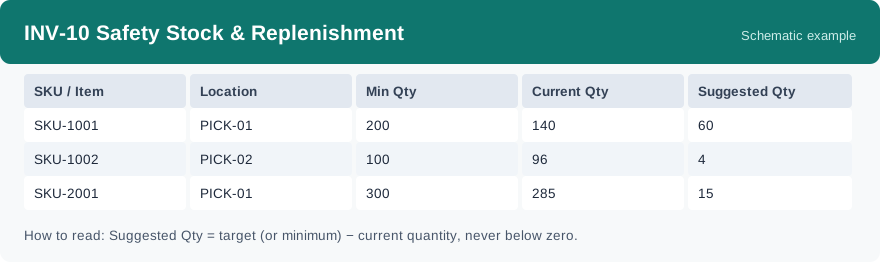
The current quantity is the total stock of that SKU at that pick location. The suggested quantity = the target quantity minus the current quantity — and when no target is set, the minimum quantity is used instead of a target — and it is never below zero. The minimum and target settings come from the pick-location minimum settings.
Dimensions and filters#
- SKU / Item — the product
- Location — the pick location the row is about
- Min Qty — the minimum quantity set for that pick location
- Current Qty — the quantity currently at that pick location
- Suggested Qty — how much to top up, never below zero
- Filters you can set: warehouse only. This report has no date or client filter.
How to read it#
Work the rows with a suggested quantity above zero first — those are the pick locations that need topping up, and the suggested quantity is the amount to bring. Then glance at the rows where the current quantity sits just above the minimum: they are fine today but will be next in line after another busy picking round.
Typical uses#
- A daily top-up round: run it before the picking shift, export the rows that need stock, and hand the list to the floor team.
- After a big outbound day: check which pick locations the busy day drained, before the next day starts.
- Spotting pick locations that keep running low: a location that shows up with a suggested quantity day after day deserves a second look at its minimum setting.
Report features used in this article: open INV-10 in Reports, set the warehouse, and click Run; download the result as a CSV to hand the top-up list to the floor team, or set up a subscription so the list arrives by email on a schedule.
Note on subscriptions: your subscription and its filters are saved right away. Scheduled email delivery is being switched on in stages — sending starts as soon as delivery opens for your organization.