OPS-02 Task Completion Report
Daily completed and in-progress task volumes by type and status.
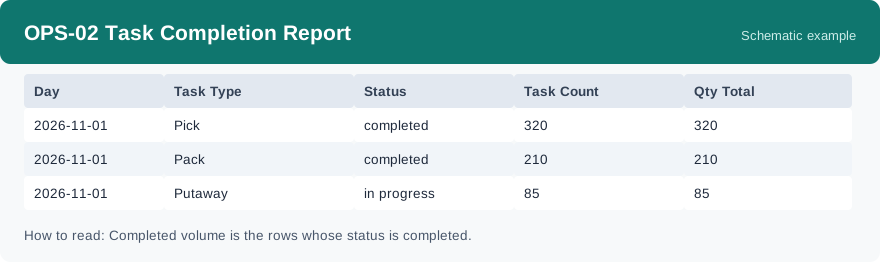
This report shows the daily task volumes of the warehouse, grouped by task type and status: how much was completed each day and how much is still in progress. It is refreshed daily, so today’s rows grow until the day closes.
What this report is for#
Use it to see the working rhythm of the floor: which task types carry the day, whether completions keep up, and how much work is still open at day end. It is the daily volume ledger behind the outbound dashboard card.
How the numbers are counted#
The figures come from the daily task summary, refreshed daily. Completed volume is the rows whose status is completed; rows with other statuses are work still in progress. The quantity total currently shows the same value as the task count, because tasks themselves carry no quantity figure — read it as a task count, not as pieces handled.
Dimensions and filters#
- Day — the day the row belongs to
- Task Type — the kind of task
- Status — the status of those tasks
- Task Count — how many tasks in the group
- Qty Total — currently the same value as the task count
- Filters you can set: Date Range, Warehouse
How to read it#
Each row is one day, one task type and one status. For a day, add the completed rows of a type to see its output, and look at the non-completed rows to see what is still open. Compare the same type across days to spot busy days and slow days.
Typical uses#
- Check at day end how much of each task type was completed
- See how much work is still in progress before planning the next shift
- Compare busy and quiet days across a week
Reports features used in this article: pick this report in Reports, set the date range or warehouse filter and click Run to see the result; use Export to download the result as a CSV file; or use Subscribe to have the same view sent to your inbox on a schedule. Your subscription and its filters are saved right away, and scheduled email delivery is being switched on in stages — sending starts as soon as delivery opens for your organization.
How this differs from OPS-05 Outbound Productivity Dashboard: both come from the same daily task summary and show the same numbers. OPS-02 is the full table with status and quantity columns for checking detail, while OPS-05 is the same data presented as a dashboard card for a quick glance at the daily rhythm.