Outbound order state machine
Last updated 2026-10-19
Outbound shipment states and events: from draft to closed, covering pick tasks, pack station, carrier handover, staged FTL pallets, and returns to stock.
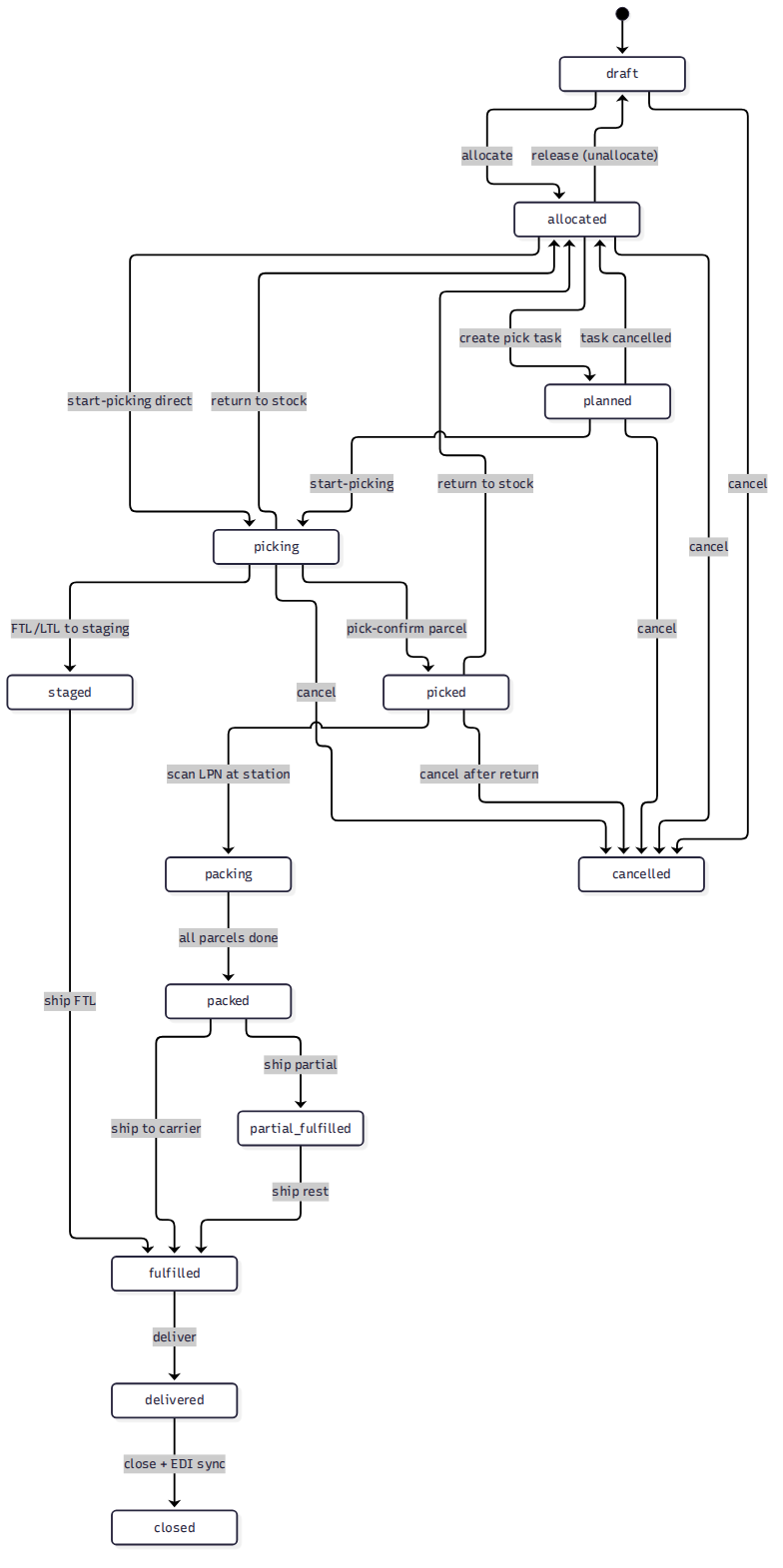
Event table#
| Event | From | To | Trigger | Actor | Side effects |
|---|---|---|---|---|---|
| [allocate] | draft | allocated | Allocate inventory | System / Warehouse | Inventory locked |
| [create pick task] | allocated | planned | Create a pick task (order / cluster / wave) | Warehouse | WMS task created; order waits for picking |
| [cancel task] | planned | allocated | Pick task cancelled | Warehouse | — |
| [start-picking] | planned | picking | Start the pick task on mobile | Picker | — |
| [pick-confirm] | picking | picked | Picking confirmed (small parcel) | Picker | — |
| Picking done | picking | staged | FTL / LTL full-pallet pick done | Picker | Pallets dropped in staging, waiting for loading |
| [return to stock] | picking | allocated | Return picked items (full return only) | Picker | Putaway task created |
| [return to stock] | picked | allocated | Order-level return (full return only) | Picker | Putaway task; defaults to original pick location |
| [start at pack station] | picked | packing | Scan LPN / order at the pack station | Packer | — |
| [all parcels done] | packing | packed | All parcels weighed and labeled | Packer | 3PL billing recorded (gift wrap + pack materials) |
| [ship] | packed | fulfilled | Hand over to the carrier | System | Inventory deducted; waybills created; OMS notified |
| [ship] | staged | fulfilled | Ship the FTL load | System | Must be added to a Load first |
| [deliver] | fulfilled | delivered | Delivery confirmed | System / Manual | — |
| [close] | delivered | closed | Sync EDI / partner data, then close | System | Terminal state |
| [cancel] | draft / allocated / planned | cancelled | Cancel the order | System / Warehouse | — |
Two legs: small parcel (picked → packing → packed → fulfilled) and FTL/LTL (picking → staged → fulfilled). Carrier handover mode is per-warehouse: auto ships straight to fulfilled after labeling; manual requires a handover confirmation on mobile.