OPS-04 Packing Productivity Report
Packing station activity by station, action and result.
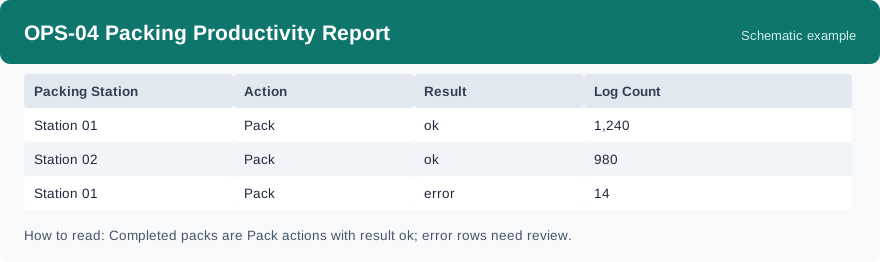
This report shows packing station activity, grouped by station, action and result: how much packing work each station did, and how much of it ended in an error. It uses real-time data, so it reflects station activity as it stands when you run it.
What this report is for#
Use it to balance the packing benches: which station carries the most completed packs, and which station keeps hitting errors that need a second look. It turns station activity into comparable counts per station.
How the numbers are counted#
This report counts packing station log entries. Completed packs are the pack actions with an ok result. Rows with an error result are the interception and failure cases — they were stopped for a reason and need review, so do not count them as completed output.
Dimensions and filters#
- Packing Station — which packing station
- Action — what action was logged
- Result — how the action ended, ok or error
- Log Count — how many log entries in the group
- Filters you can set: Date Range, Warehouse
How to read it#
Each row is one station, one action and one result. For output, read the pack rows with an ok result. Then read the same station’s error rows: a station with high output and a small share of errors is healthy; errors clustering on one station or one action are the review list.
Typical uses#
- Compare completed packs across stations on a busy day
- Find stations or actions where errors keep repeating
- Review the error rows before the next shift starts
Reports features used in this article: pick this report in Reports, set the date range or warehouse filter and click Run to see the result; use Export to download the result as a CSV file; or use Subscribe to have the same view sent to your inbox on a schedule. Your subscription and its filters are saved right away, and scheduled email delivery is being switched on in stages — sending starts as soon as delivery opens for your organization.
How this differs from OPS-06 Operations Exception Report: OPS-04 stays at the packing station — its error rows are packing interceptions and failures logged at the bench. OPS-06 is wider: it counts exception-related actions across operations. A packing problem that was handled as an exception can appear in both views, for different reasons.