INV-03 Inventory by Lot
Stock by lot with on-hand / allocated quantities and expiry dates.
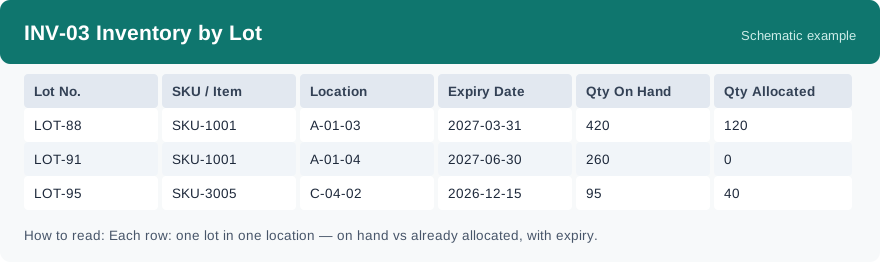
This report shows stock lot by lot: for each lot you can see how much is on hand, how much is already allocated, and when the lot expires. It uses real-time data, so it reflects the lots as they stand when you run it.
What this report is for#
Use it when lots matter: to follow a specific lot, to see which lots expire soon, or to check how much of a lot is still free after allocation. It is also the place to see allocated quantity, which INV-01 does not show.
How the numbers are counted#
The figures come from the lot-level stock records: on-hand and allocated quantities are added up per lot, SKU and location, and each row carries the expiry date of that lot. On-hand is the total held for the lot; allocated is the part already set aside for orders.
Dimensions and filters#
- Lot No. — the lot
- SKU / Item — the product
- Location — where this lot is stored
- Expiry Date — when the lot expires
- Qty On Hand — quantity held for the lot
- Qty Allocated — quantity already allocated
- Filters you can set: Warehouse, Client
How to read it#
Read one lot per row: on-hand minus allocated is the part not yet set aside. Check the expiry date on the same row — a lot with plenty on hand but a near expiry date needs attention first. The same lot can appear on more than one row if it sits in more than one location.
Typical uses#
- Follow one lot from receipt to outbound and check its remaining quantity
- Find lots that expire soon and deal with them first
- Check how much of a lot is already allocated to orders
Reports features used in this article: pick this report in Reports, set the warehouse or client filter and click Run to see the result; use Export to download the result as a CSV file; or use Subscribe to have the same view sent to your inbox on a schedule.
Note on subscriptions: your subscription and its filters are saved right away. Scheduled email delivery is being switched on in stages — sending starts as soon as delivery opens for your organization.