OUT-07 Open Orders Report
Outbound orders not yet shipped, by status, client and warehouse.
This report lists outbound orders that have not shipped yet, counted by status, client and warehouse, so you can track everything that is still open. It uses real-time data, so it reflects open orders as they stand when you run it.
What this report is for#
Use it as the chase list for unshipped work: what is still open, whose it is, which warehouse holds it, and which stage it has reached. It is the end-of-day sweep for orders that should have gone out, and the first place to look when a client asks where an order stands.
How the numbers are counted#
This report counts only open outbound orders — orders in one of these nine statuses: draft (created, work not started), planned (planned, waiting for the next step), allocated (stock has been allocated to the order), picking (being picked now), picked (picking finished, waiting to be packed), packing (being packed now), packed (packed, waiting for the next outbound step), staged (goods are ready in the staging area, waiting to ship) and partial_fulfilled (part has shipped, the rest has not). Orders that are fulfilled, delivered or cancelled are not counted — if an order leaves this report, it has reached one of those end states.
Dimensions and filters#
- Status — which open stage the order is at
- Client — who the open orders belong to
- Warehouse — which warehouse holds the work
- Shipment Count — how many open outbound orders are in the group
- Filters you can set: Date range, Warehouse, Client
How to read it#
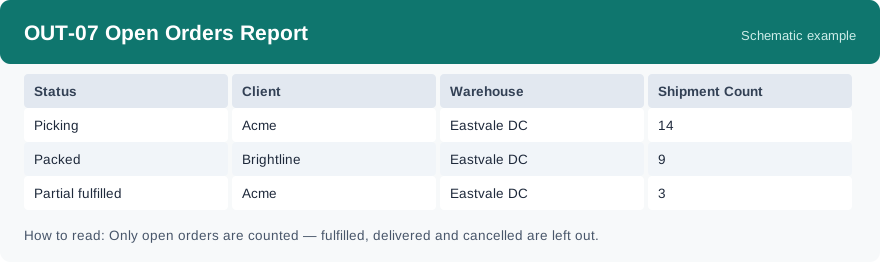
Each row is one status, for one client, at one warehouse, with the count of open orders in that group. Filter by warehouse to sweep one site, or by client to answer one client. Start from the biggest counts, and give partial_fulfilled rows a close look: part of those orders has already shipped, so the rest should not be forgotten.
Typical uses#
- End-of-day sweep for orders that have not shipped
- Answer a client asking which of their orders are still open
- Balance unshipped work between warehouses
Reports features used in this article: pick this report in Reports, set the date range, warehouse or client filter and click Run to see the result; use Export to download the result as a CSV file; or use Subscribe to have the same view sent to your inbox on a schedule. Your subscription and its filters are saved right away, and scheduled email delivery is being switched on in stages — sending starts as soon as delivery opens for your organization.
How this differs from its neighbours: OUT-02 Fulfillment Progress Report is the board view of the same outbound orders across every stage, including fulfilled; this report counts only the ones still open, and splits them by client and warehouse so you can chase them. The orders on this list that are waiting for stock are the ones OUT-03 Backorder & Shortage Report focuses on.