OPS-05 Outbound Productivity Dashboard
Daily outbound task rhythm by task type, as a dashboard card in the KPI domain composition.
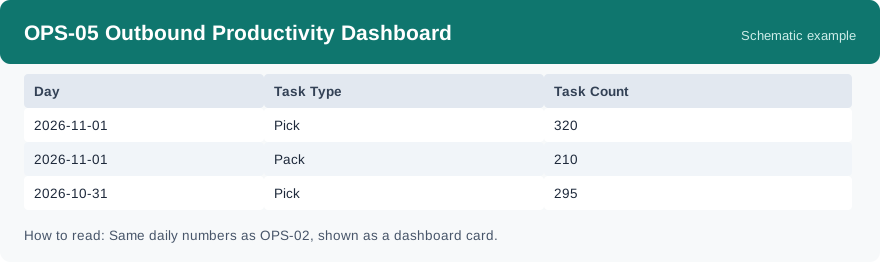
This dashboard card shows the daily outbound task rhythm by task type: how many tasks of each type there are per day, in a compact card form made for glancing at a dashboard. It is refreshed daily, like the task report behind it.
What this report is for#
Use it on the dashboard for a fast daily check: is today’s outbound rhythm normal, which task type is running hot, and does the day need attention before you open any detail report? It is made for spotting the day, not for auditing it.
How the numbers are counted#
This card is the dashboard form of OPS-02 Task Completion Report: it comes from the same daily task summary and shows the same numbers. It is a composition card, not a second set of statistics — if a number here and in OPS-02 ever seem to differ, they should not: check the date range and warehouse selected on each side first.
Dimensions and filters#
- Day — the day the row belongs to
- Task Type — the kind of task
- Task Count — how many tasks of that type on that day
- Filters you can set: Date Range, Warehouse
How to read it#
Read it as a rhythm chart: follow one task type across the days to see its ups and downs, and compare types on the same day to see the mix of work. For status detail — what is completed and what is still open — switch to OPS-02, which carries the full columns.
Typical uses#
- Glance at today’s outbound rhythm on the dashboard in the morning huddle
- Spot a day where one task type suddenly spikes or drops
- Compare the daily mix of outbound task types across a week
Reports features used in this article: pick this report in Reports, set the date range or warehouse filter and click Run to see the result; use Export to download the result as a CSV file; or use Subscribe to have the same view sent to your inbox on a schedule. Your subscription and its filters are saved right away, and scheduled email delivery is being switched on in stages — sending starts as soon as delivery opens for your organization.
How this differs from OPS-02 Task Completion Report: there is no difference in the numbers — same daily summary, same counts. The difference is the form: OPS-05 is the compact dashboard card showing day, task type and task count, while OPS-02 is the full table with status and quantity columns for detail work.