INV-11 Inventory Valuation
On-hand stock valued at the resolved unit cost, by client, warehouse and SKU, split by currency.
This report puts a money value on the stock you hold: for each client, warehouse and SKU it multiplies the on-hand quantity by the resolved unit cost and shows the valuation amount, split by currency. It uses real-time data, so the value reflects stock and costs as they stand when you run it.
What this report is for#
Use it when stock needs a value, not just a quantity: for month-end valuation, for answering a client who asks what their goods in your warehouse are worth, or for spotting the SKUs that carry no cost yet and therefore stay out of the totals.
How the numbers are counted#
Quantities are the current stock balance by client, warehouse and SKU — the same balance used for allocation. The license-plate-level detail in INV-01 can differ for stock that is not held on license plates. The unit cost is resolved per SKU and currency from the item cost history: manual corrections always win; otherwise the latest purchase price (from purchase orders) is preferred over the standard cost maintained on the item, taking the newest entry within each source. The valuation amount is the on-hand quantity multiplied by that resolved unit cost.
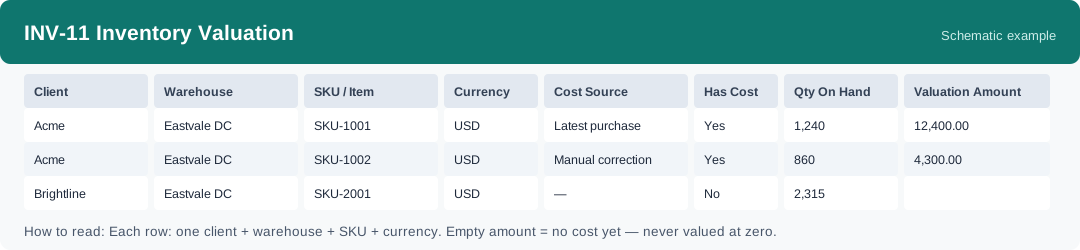
SKUs without any cost row are still listed with their quantity and an empty amount — see the rows marked Has Cost = No. They are never valued at zero, so totals understate the true stock value until costs are maintained. Amounts are grouped by currency and must never be added across currencies.
Where costs come from, and how to fix them: you can view and correct an item’s cost on the product page in OMS, in the price section — a correction always asks for a reason, and that corrected value is the one this report uses first. Purchase prices are captured automatically when receiving is completed, so a SKU bought through a purchase order normally gets its latest purchase price without extra work. The standard cost is the fallback maintained on the item itself.
Dimensions and filters#
- Client — who owns the goods
- Warehouse — which warehouse holds the stock
- SKU / Item — the product
- Currency — the currency of the cost and the amount; each currency is shown separately
- Cost Source — where the unit cost came from: Manual correction, Latest purchase price, or Item standard cost
- Has Cost — Yes when a cost was resolved for the SKU; No when the amount stays empty
- Qty On Hand — the current stock balance quantity for the group
- Valuation Amount — Qty On Hand multiplied by the resolved unit cost, in the row’s currency
- Filters you can set: Warehouse, Client
How to read it#
Each row is one client, one warehouse, one SKU, one currency and one cost source. Read the Cost Source before you trust the amount: a manual correction is a value someone has deliberately set, a purchase price follows what you last paid, and a standard cost is only the maintained fallback. Check the Has Cost = No rows first — every such row is stock that is missing from the money totals, and fixing its cost on the product page brings it into the valuation. When you add rows up, add only rows in the same currency.
Typical uses#
- Produce the month-end stock value per client and currency for finance
- Answer a client who asks what their stock in the warehouse is worth
- Find SKUs with no cost (Has Cost = No) and maintain their costs so the totals become complete
- Compare the valuation of the same client across warehouses, within one currency
Reports features used in this article: pick this report in Reports, set the warehouse or client filter and click Run to see the result; use Export to download the result as a CSV file; or use Subscribe to have the same view sent to your inbox on a schedule.
Note on subscriptions: your subscription and its filters are saved right away. Scheduled email delivery is being switched on in stages — sending starts as soon as delivery opens for your organization.